What Are ROPs in GPU? (A Complete Guide)
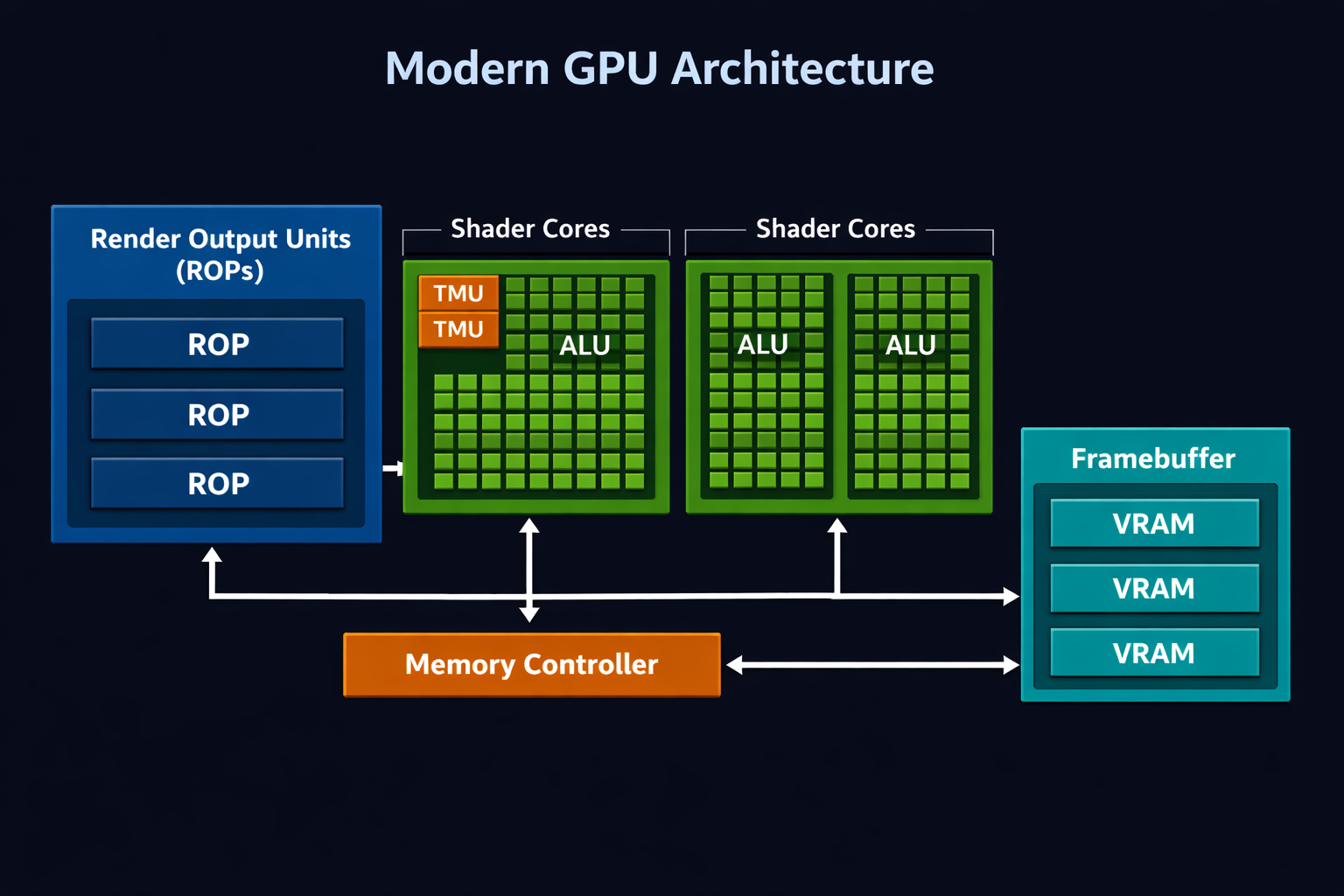
ROPs in GPUs (Render Output Units) are components that handle the final stage of image rendering. They manage pixel blending, depth testing, anti-aliasing, and write completed pixels to the framebuffer. Higher ROP counts improve pixel fill rate and high-resolution gaming performance.
Understanding ROPs is essential because they directly impact pixel fill rate, high-resolution gaming performance, and overall visual output quality.
What Do ROPs Do in a GPU?
ROPs in GPUs operate at the output merger stage of the graphics pipeline.
After shaders calculate lighting, textures, and effects, ROPs:
- Blend pixel colors
- Perform depth and stencil testing
- Handle MSAA (Multisample Anti-Aliasing)
- Apply gamma correction
- Write final pixels to memory
Without ROPs, shaders cannot turn calculations into visible images.
Think of shaders as artists and ROPs as the final printing press.
Where ROPs Fit in the Graphics Pipeline?
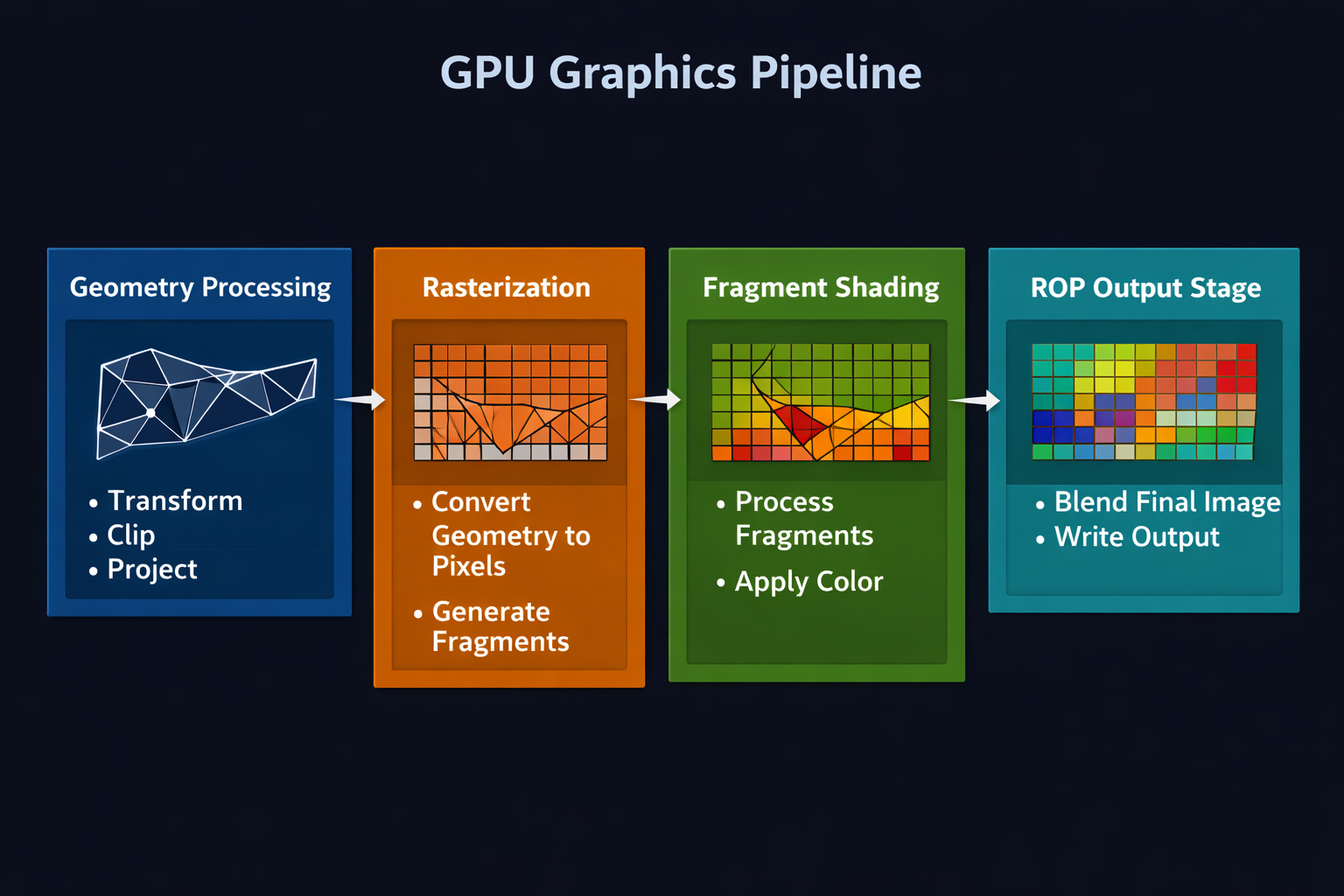
The simplified GPU pipeline:
- Geometry Processing
- Rasterization
- Fragment Shading
- Render Output (ROPs)
At this stage, fragments become final display-ready pixels.
This stage is heavily dependent on:
- Memory bandwidth
- Framebuffer speed
- Pixel throughput
Even powerful shaders cannot compensate for weak ROP performance at 4K or 8K resolution.
Why ROP Count Matters for Performance?
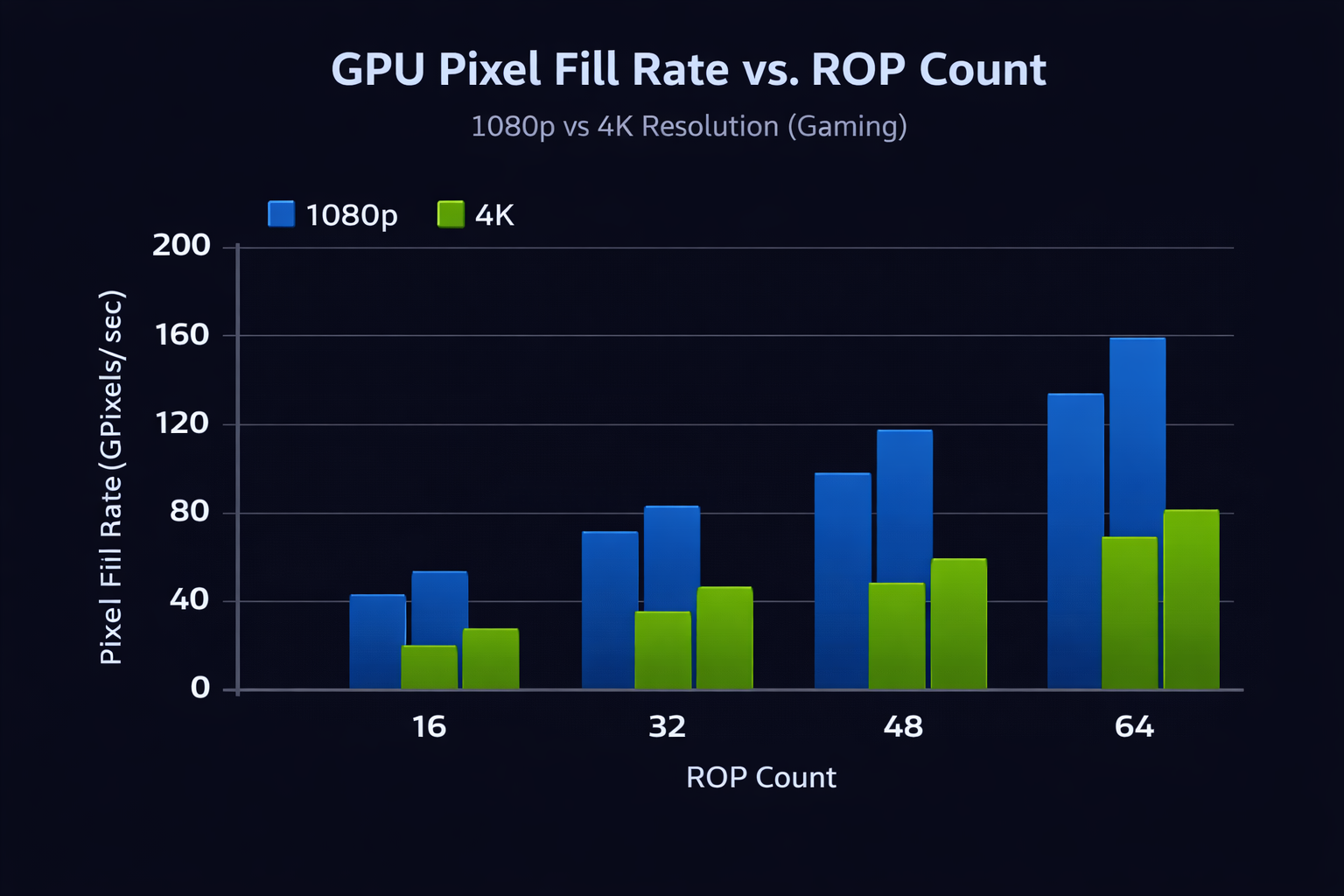
ROPs directly affect Pixel Fill Rate.
Formula:
Pixel Fill Rate = ROP Count × GPU Clock Speed
Higher fill rate improves:
- 4K gaming performance
- 8K rendering
- MSAA workloads
- Raster-heavy engines
At 1080p, ROP limitations are rare.
At 4K, they become critical.
Also Read: Is Fortnite CPU or GPU Heavy?
ROP Count Comparison: Popular High-End GPUs:
| GPU Model | ROP Count | Pixel Fill Rate (Approx.) | 4K Gaming Strength |
| NVIDIA GeForce RTX 5090 | 176 | Very High | Excellent |
| NVIDIA GeForce RTX 5080 | 112 | High | Strong |
| AMD Radeon RX 7900 XTX | 96 (Render Backends) | High | Strong |
More ROPs do not always guarantee dominance; memory bandwidth and architecture efficiency also matter.
RTX 50 Series Missing ROPs Issue Explained:
Some early units in the RTX 50 series were reported to have disabled ROP partitions due to manufacturing variation.
Expected ROP counts:
- RTX 5090 :176
- RTX 5080 :112
- RTX 5070 Ti: Lower-tier scaling
Performance impact:
- 4 to 11% lower FPS at 4K
- Minimal impact on AI workloads
- Little effect on video encoding
This confirms that ROP performance mainly affects raster output, not computationally intensive AI tasks.
NVIDIA ROPs vs AMD Render Backends:
NVIDIA uses the term ROPs.
AMD refers to similar units as Render Backends.
NVIDIA Approach:
- More decoupled scaling
- Strong in DLSS-upscaled rendering
- High pixel throughput focus
AMD Approach:
- Integrated within Workgroup Processors
- Efficient raster pipeline
- Strong value in pure raster games
Both architectures balance shader cores, TMUs, memory controllers, and output units differently.
ROPs and Anti-Aliasing Performance:
ROPs are essential for:
- MSAA sample resolving
- Alpha blending
- Depth buffer operations
Higher ROP counts allow smoother edge rendering without heavy FPS drops.
Modern techniques like:
- DLSS
- FSR
- TAA
reduce ROP stress, but do not eliminate the need for strong output units.
How to Check Your GPU’s ROP Count?
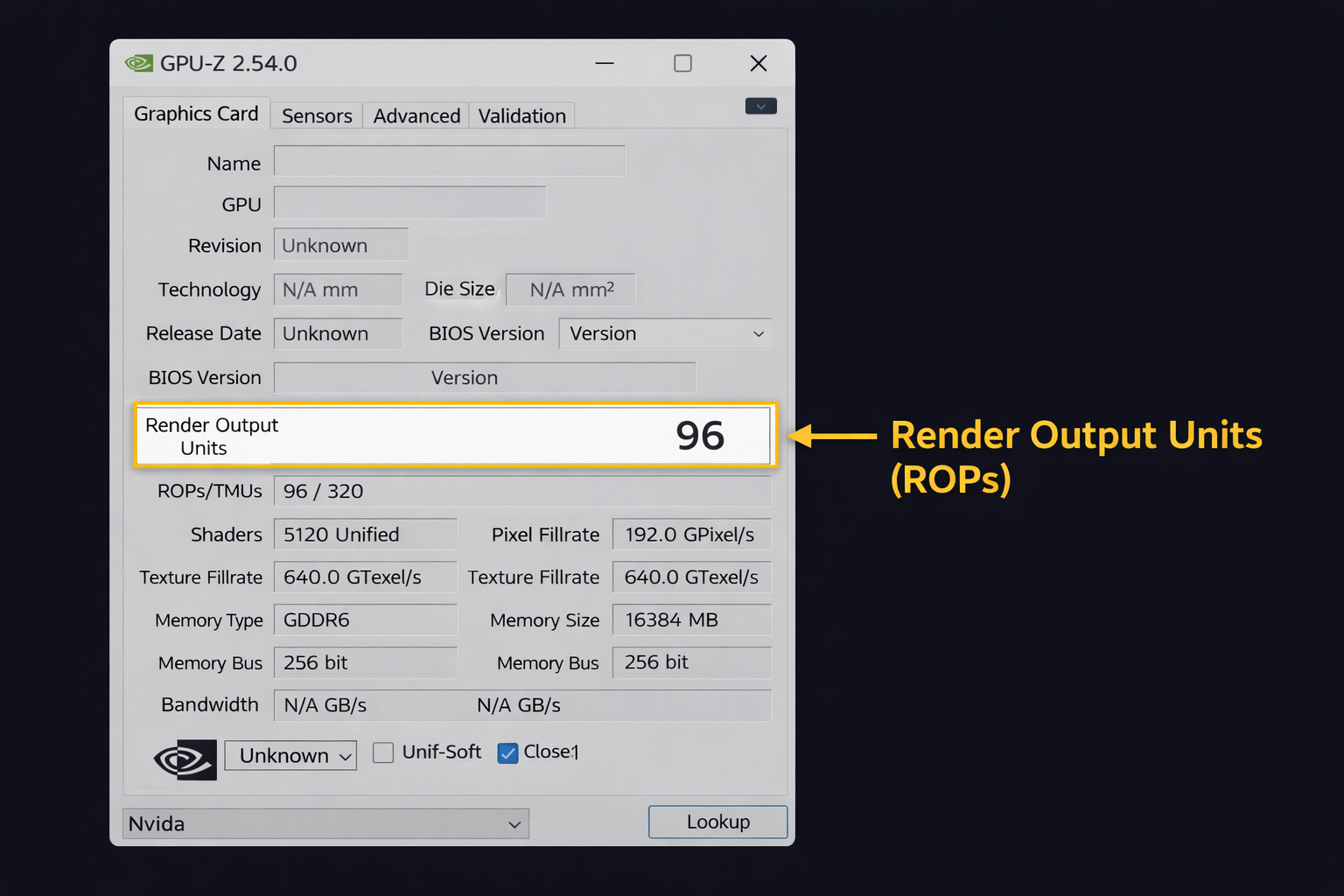
Use GPU-Z:
- Install GPU-Z
- Open the Graphics Card tab
- Check “Render Output Units”
Compare with official specifications.
If lower than expected:
- Contact manufacturer
- Request RMA if under warranty
Always verify high-end GPUs after purchase.
You can also verify ROP counts and full GPU specs using the GPU specifications database to confirm your card’s exact configuration.
Do ROPs Affect AI and Professional Workloads?
Mostly limited impact.
AI and computing rely on:
- CUDA cores
- Tensor cores
- Compute shaders
However, ROPs help in:
- Real-time viewport rendering
- Color blending in video preview
- 3D modeling display output
They matter more for raster visualization than pure computation.
Also Read: How Much CPU Usage is Normal?
Common ROP Bottleneck Scenario:
A common mistake in GPU buying:
- High shader count
- Large VRAM
- But moderate ROP count
At 4K, this creates an imbalance.
Balanced architecture =
Shader power + Memory bandwidth + ROP throughput.
Ignoring one component can create hidden bottlenecks.
Also Read: Laptop vs Desktop CPU Performance
Future of ROP Technology:
Future GPU trends suggest:
- Improved compression algorithms
- Smarter bandwidth allocation
- Chiplet-based output partitioning
- Higher efficiency per ROP instead of raw scaling
Rather than just increasing ROP count beyond 256, efficiency improvements will define next-gen performance.
Also Read: How to Reduce CPU Usage While Gaming
FAQ’s:
What are ROPs in a GPU?
ROPs (Render Output Units) handle final pixel operations like blending, depth testing, and writing images to the framebuffer.
Do more ROPs increase FPS?
Yes, especially at high resolutions like 4K and 8K, where pixel fill rate matters.
Why are some RTX 50 GPUs missing ROPs?
Rare manufacturing variation caused disabled ROP partitions in some early production units.
How do I check ROP count?
Use GPU-Z and verify the Render Output Units field.
Are ROPs the same as AMD Render Backends?
Functionally similar, but architecturally implemented differently.
Do ROPs matter for 1080p gaming?
Not significantly. They become more important at higher resolutions.
Conclusion:
Understanding what ROPs in the GPU help you see how graphics cards produce final images. ROPs handle pixel output, blending, and depth processing, which directly affects high-resolution performance. While often overlooked, they play a key role in smooth 4K gaming and overall visual quality.